Out Of This World Card with Seth Apter's New Dies
on October 18, 2017

Out Of This World Card with Seth Apter's New Dies

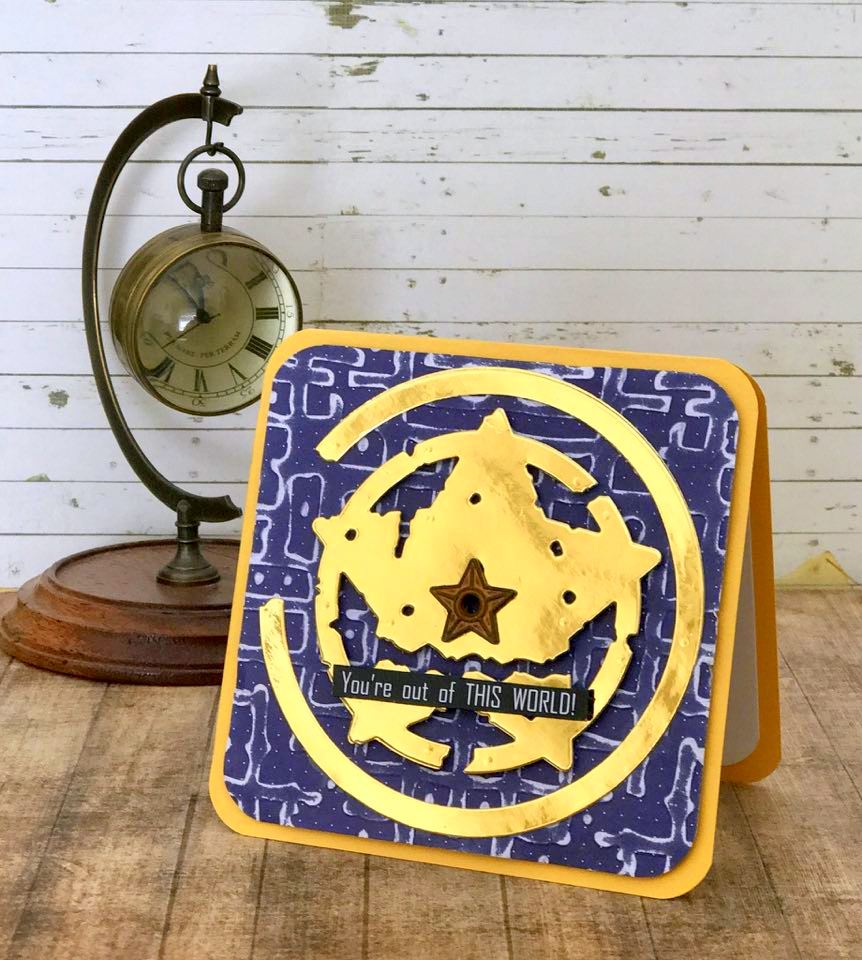
Hello it is Linda Lucas, I am so glad you have joined me.  I am sharing ​​​​a card created using one of the new dies by Seth Apter - the Urban Grunge appeal of these dies is not limited to Mixed Media - I love to use them in card making - and it is so easy as you can see in this step by step tutorial.

Out Of This World Card with Seth Apter's New Dies. Project by Linda Lucas

It is as easy as using one die set and an embossing folder

Out Of This World Card with Seth Apter's New Dies

1.Cut & emboss one Outlaw Etched dies by Seth Apter using both inner and outer dies.

Out Of This World Card with Seth Apter's New Dies

2. Emboss blue patterned paper 4 1/4" x 41/4" using the Seth Apter Gridiron embossing folder. 3. Round the Corners. ​ 4. Pop up onto a pre-cut yellow card base, 4 1/2" x 4 1/2", using 3D foam squares. 5. Pop up the inner die cut onto the centre of the card front using 3D foam squares. 6. Glue the outer die cut onto the card front using liquid glue. 7. Glue the Star embellishment to the centre of the star. 8. Adhere the computer generated sentiment across the base of the star.
Spellbinders Supplies:

Other Supplies: Scrapbook Adhesives by 3L® (Extreme Double Sided Tape 1/4″ (6 yds)); Imagine Crafts (Memento Ink – Tuxedo Black); Sanding Block; Want2Scrap© Bling;  Cardstock; Liquid Glue; Star Embellishment; Computer Generated Sentiment. Thank you so much for stopping by I hope you are inspired to get out your dies and get creating. I would love for you to visit me at Lovely Linda’s Craft Central {{{hugs}}} and happy creating!

Leave a comment

Your email will not be published. Please note, comments need to be approved before they are published.


  • HOW TO USE PRESS PLATES WITH MULTIPLE INKS | CREATE YOUR WAY HOLIDAY, BPR-050, BPI-049, BPI-003

    BP-001

    How to Use Multiple Ink Colors with BetterPress Registration Plates

    Create a colorful Christmas card while learning how to apply multiple ink colors to BetterPress registration plates. In this detailed tutorial, you’ll use the Festive Evergreens Registration Press + Foil Plate & Die Set to press a holiday doorway scene in three colors, combining the built-in registration system with a simple masking technique. The registration template positions the coordinating plates so each layer aligns with...

  • How to Make a Colorful Foiled Butterfly Card with Glimmer II

    BP-351

    How to Make a Colorful Foiled Butterfly Card with Glimmer II

    Combine hot foiling, alcohol-marker coloring, ink blending, and dimensional shaping to create a colorful butterfly card that sparkles from every angle. In this step-by-step tutorial, you’ll learn how to foil detailed butterflies and a floral background with the Glimmer II Hot Foil System, add bold color, and shape the butterfly wings for a realistic raised effect. The Bright Butterflies and Thanks In Bloom Press +...

  • How to Heat Emboss with BetterPress Plates: Snowman Christmas Card

    BP-001

    How to Heat Emboss with BetterPress Plates: Snowman Christmas Card

    BetterPress plates can do more than create letterpress impressions and hot-foiled designs. In this detailed Christmas card tutorial, you’ll learn how to apply clear sticky ink to a BetterPress plate and use white embossing powder to produce a crisp, heat-embossed snowflake background. The tutorial also covers pressing and die cutting a sentiment, assembling three detailed snowmen, and arranging the finished elements on an A2 card....